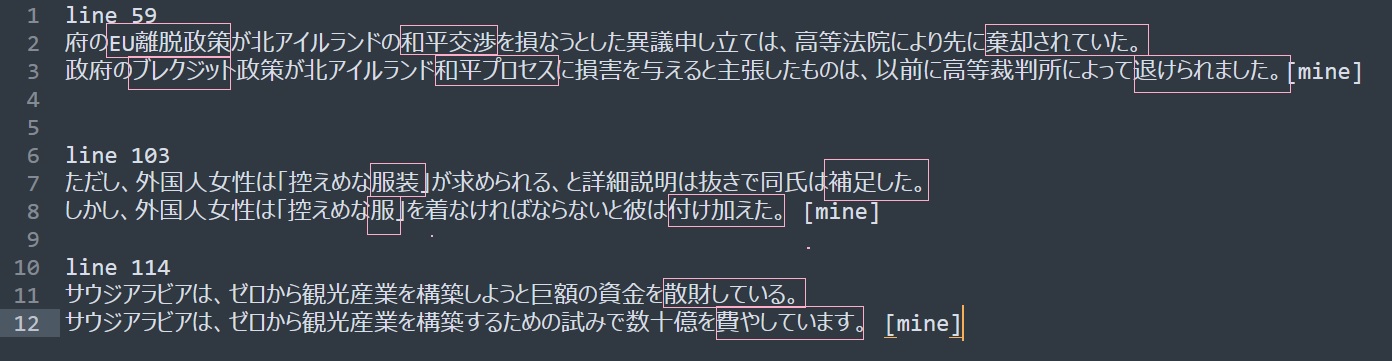
Although both beam sizes 3 and 5 give the same BLEU score, running diff on both target files shows they are not the same at all. Obviously, this would require human evaluation.
By the way this is what I was talking about with how my model produces semantically similar sentences, but leans towards Japanese verb forms rather than those derived from Chinese like in the WMT reference.
Thanks, Matthew! I understand your point, as illustrated by your screenshot. Japanese is a sophisticated language. Maybe it can benefit from some semantic evaluation metric.
As for the French-to-English model, you can find a recent version in the CTranslate2 format here.
As for the English-to-Arabic model, this was an experimental model trained on about 400k segments from MS Terminology. It used RNN-LSTM, not the Transformer model, so it cannot be converted to the CTranslate2 format.
For training an English-to-Arabic model, I would recommend using enough data from OPUS (maybe, avoid crawled corpora), and applying the Transformer model. I am working on a new English-to-Arabic model, and I can publish it once it is finished.
Domain Adaptation
For Domain Adaptation, i.e. to create specialized models, one needs to have a good baseline model trained on enough (general) data, and then fine-tune it on in-domain data. This is because usually in-domain data is less, and might not be enough to train a strong model from scratch. There are multiple ways for Domain Adaptation. For example, I explained Mixed Fine-tuning (Chu et al., 2017) in this blog.
Pre-trained Models
Nowadays, you can find a lot of pre-trained models. Obviously, not all of them of good quality, but you can try.
M2M-100 model supports 100 languages, including Arabic. You can find a CTranslate2 version of it that you can use in DesktopTranslator here.
Argos Translate models: Argos Translate is another good tool. It also supports CTranslate2 models. So you can download the model you want from the list of models. Then, change the extension to zip and extract it. You will find the CTranslate2 model and SentencePiece model, that you can use in DesktopTranslator as well.
I tried device=‘cuda’, and the program didn’t work and returned the following error:
Warning : load_model does not return WordVectorModel or SupervisedModel any more, but a FastText object which is very similar.
Exception in Tkinter callback
Traceback (most recent call last):
File “D:\Python\Python38\lib\tkinter_init_.py”, line 1883, in call
return self.func(*args)
File “D:/kidden/mt/open/DesktopTranslator/translator.py”, line 479, in translate_input
translations_tok = self.translator.translate_batch(
RuntimeError: Library cublas64_11.dll is not found or cannot be loaded
Does the app work well with “cpu”? If so, could you please try to fix the “cuda” issue independently first.
If you run the following code in Python, what do you get? Replace "ctranslate2_model" with the path to a CTranslate2 model. Please try the code once with device="cpu" and once with device="cuda"
The code can be run with ‘cpu’, and failed with ‘cuda’. The run error is as follows:
Traceback (most recent call last):
File “D:/kidden/mt/open/mt-ex/temp/test_ct2.py”, line 5, in
translator.translate_batch(batch)
RuntimeError: Library cublas64_11.dll is not found or cannot be loaded
I run it on Windows10 with a GPU. My GPU settings have no problem because the CTranslate2 model was trained and converted on it.